> ## Documentation Index
> Fetch the complete documentation index at: https://docs.qu.ai/llms.txt
> Use this file to discover all available pages before exploring further.
# Quaiscan에서 계약 검증하기
> Quaiscan에서 스마트 계약을 검증하는 가이드입니다.
## 소개
이 문서는 Quai Network의 블록 탐색기 [Quaiscan](https://quaiscan.io/)에서 스마트 계약을 검증하는 방법을 보여줍니다.
## 필수 조건
계약을 배포하고 Quaiscan에서 검증하려면 몇 가지 종속성이 필요합니다. 사용할 주요 종속성에 대한 개요는 다음과 같습니다.
| | |
| --------------------------------------------------------------------------------------------- | --------------------------------------------------- |
| [**NodeJS**](https://nodejs.org/en/download/) | Javascript 런타임 환경. LTS 버전을 사용하세요. |
| [**hardhat-example**](https://github.com/dominant-strategies/hardhat-example) | Quai Network용 샘플 계약 및 배포 스크립트가 포함된 Hardhat 프로젝트입니다. |
| [**hardhat-deploy-metadata**](https://github.com/dominant-strategies/hardhat-deploy-metadata) | 계약 메타데이터를 IPFS에 업로드하는 hardhat용 플러그인 |
| [**Quais.js**](https://www.npmjs.com/package/quais) | Quai Network와 상호 작용하기 위한 JavaScript 라이브러리입니다. |
## 실습
오늘은 Quai Network의 블록 탐색기인 Quaiscan에서 스마트 계약을 검증할 것입니다.
이 가이드는 [Solidity로 배포하기](https://docs.qu.ai/guides/development/solidity) 가이드를 따르므로, 시작하기 전에 해당 가이드와 [hardhat-example](https://github.com/dominant-strategies/hardhat-example) 저장소에 익숙해지는 것이 좋습니다.
### 스마트 계약 배포
[Solidity로 배포하기](https://docs.qu.ai/guides/development/solidity) 가이드를 따라 IPFS 메타데이터와 함께 스마트 계약을 배포합니다.
[hardhat-example](https://github.com/dominant-strategies/hardhat-example) 저장소를 사용할 때 명령은 `npx hardhat run scripts/deployERC20.js`여야 하며 다음과 유사한 출력이 생성됩니다:
```
File added with CID: QmPCoBa1bCFmRoTD7GuexJqBAy7pqg8J4b8B48q5DgxUEV
Original IPFS hash found in bytecode: QmPCoBa1bCFmRoTD7GuexJqBAy7pqg8J4b8B48q5DgxUEV
Metadata JSON for ERC20 saved to /../hardhat-example/Solidity/metadata/ERC20_metadata.json
Transaction broadcasted: 0x0032004cc6a910b8733ad9502caa315beb74f3409bee2b481116bddfb9c8880d
Contract deployed to: 0x0015dFe3280783CD9b126D8E0ccc728B6490b2b2
```
위 출력에서 계약의 메타데이터가 다음 해시로 `ipfs.qu.ai`에 업로드된 것을 볼 수 있습니다: `QmPCoBa1bCFmRoTD7GuexJqBAy7pqg8J4b8B48q5DgxUEV`
귀하의 해시는 **다를 것입니다**. 다음 단계에서 필요하므로 반드시 캡처하세요.
### IPFS 메타데이터 다운로드
[hardhat-deploy-metadata](https://github.com/dominant-strategies/hardhat-deploy-metadata) 플러그인을 사용할 때, IPFS 메타데이터는 프로젝트의 `metadata` 폴더에 저장되지만 Quaiscan에 적합한 형식이 아닙니다.
Quaiscan에 업로드하고 계약을 검증하기 위해 IPFS에서 적절한 형식을 다운로드해야 합니다.
계약을 배포할 때 **귀하의 IPFS 해시**를 사용하여 다음 명령을 실행하여 메타데이터를 다운로드하고 `ipfsMeta.json`으로 저장합니다.
```
curl https://ipfs.qu.ai/ipfs/[YOUR IPFS METADATA HASH] > ipfsMeta.json
```
### Quaiscan에서 스마트 계약 검증
이제 배포된 스마트 계약과 적절한 JSON 형식의 IPFS 메타데이터가 있으므로 Quaiscan에서 스마트 계약을 검증할 수 있습니다.
브라우저를 열고 Quaiscan의 [계약 검증](https://quaiscan.io/contract-verification?shard=) 페이지를 방문합니다.
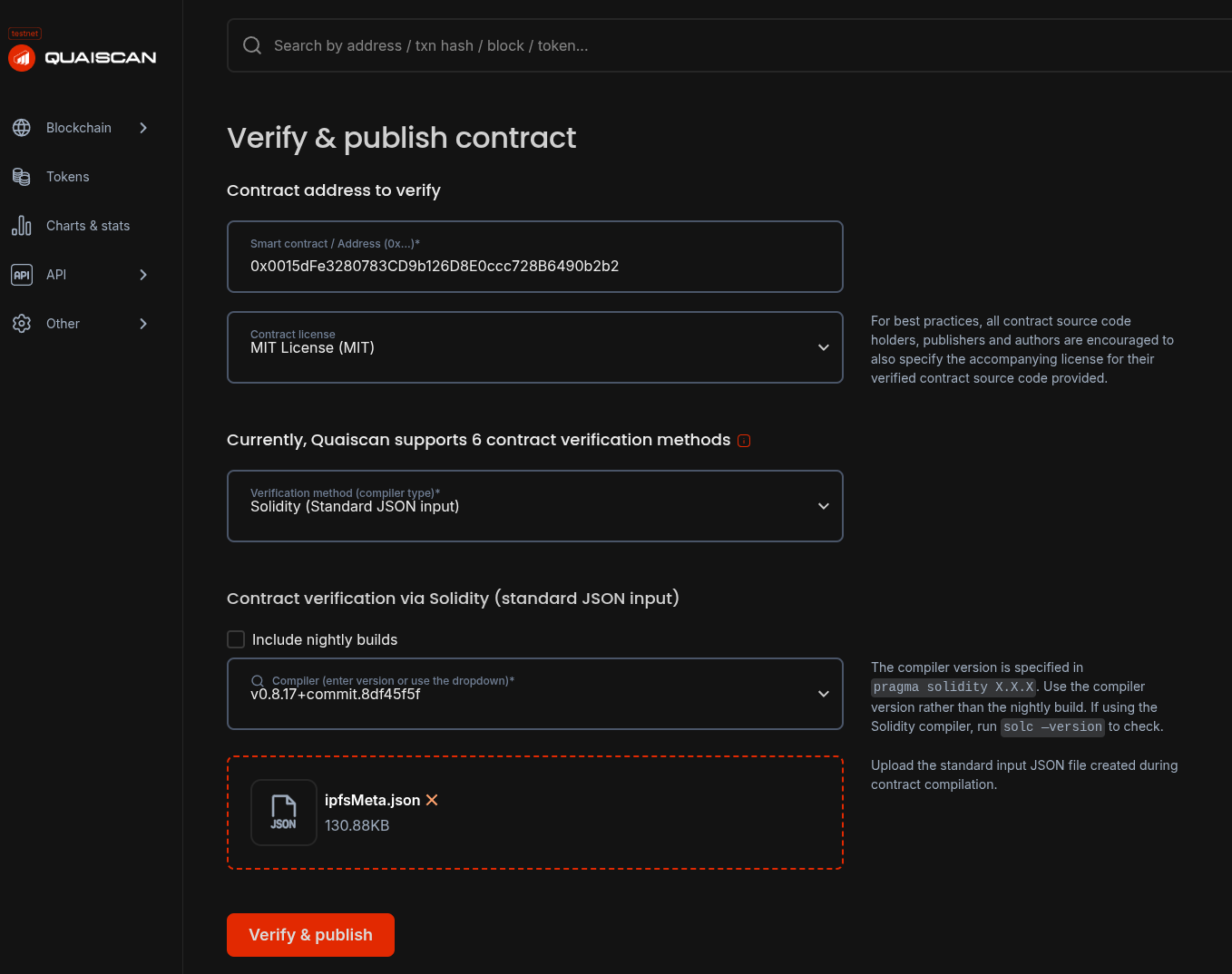
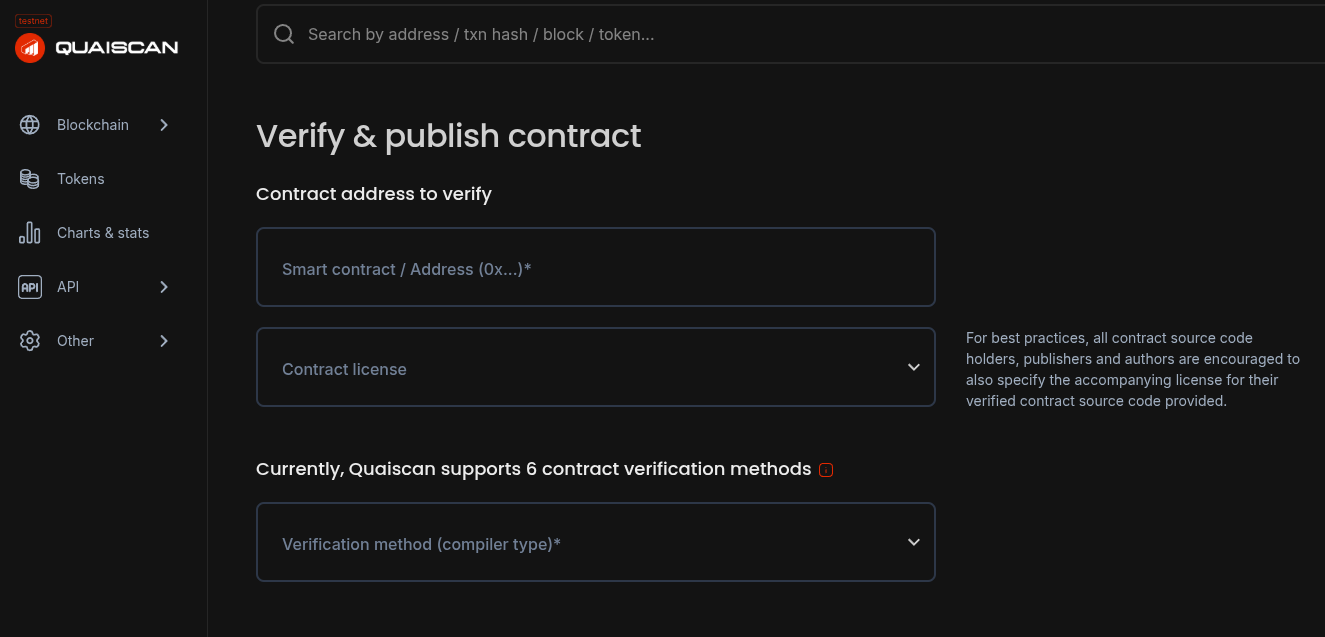 이 페이지를 사용하여 계약의 모든 세부 정보를 정확히 작성된 대로 입력합니다.
올바른 계약 주소와 계약 코드의 `SPX-License-Identifier`로 표시된 라이센스가 필요합니다.
검증 방법으로 \*\*Solidity (Standard JSON input)\*\*을 선택하고 계약을 컴파일하는 데 사용된 Solidity 컴파일러의 올바른 버전을 선택합니다.
마지막으로 `ipfsMeta.json`을 업로드하고 **Verify & Publish**를 클릭하여 스마트 계약을 검증합니다.
이 페이지를 사용하여 계약의 모든 세부 정보를 정확히 작성된 대로 입력합니다.
올바른 계약 주소와 계약 코드의 `SPX-License-Identifier`로 표시된 라이센스가 필요합니다.
검증 방법으로 \*\*Solidity (Standard JSON input)\*\*을 선택하고 계약을 컴파일하는 데 사용된 Solidity 컴파일러의 올바른 버전을 선택합니다.
마지막으로 `ipfsMeta.json`을 업로드하고 **Verify & Publish**를 클릭하여 스마트 계약을 검증합니다.
 성공하면 Quaiscan에서 계약 페이지를 방문하여 직접 상호 작용하고 검증 상태를 확인할 수 있습니다.
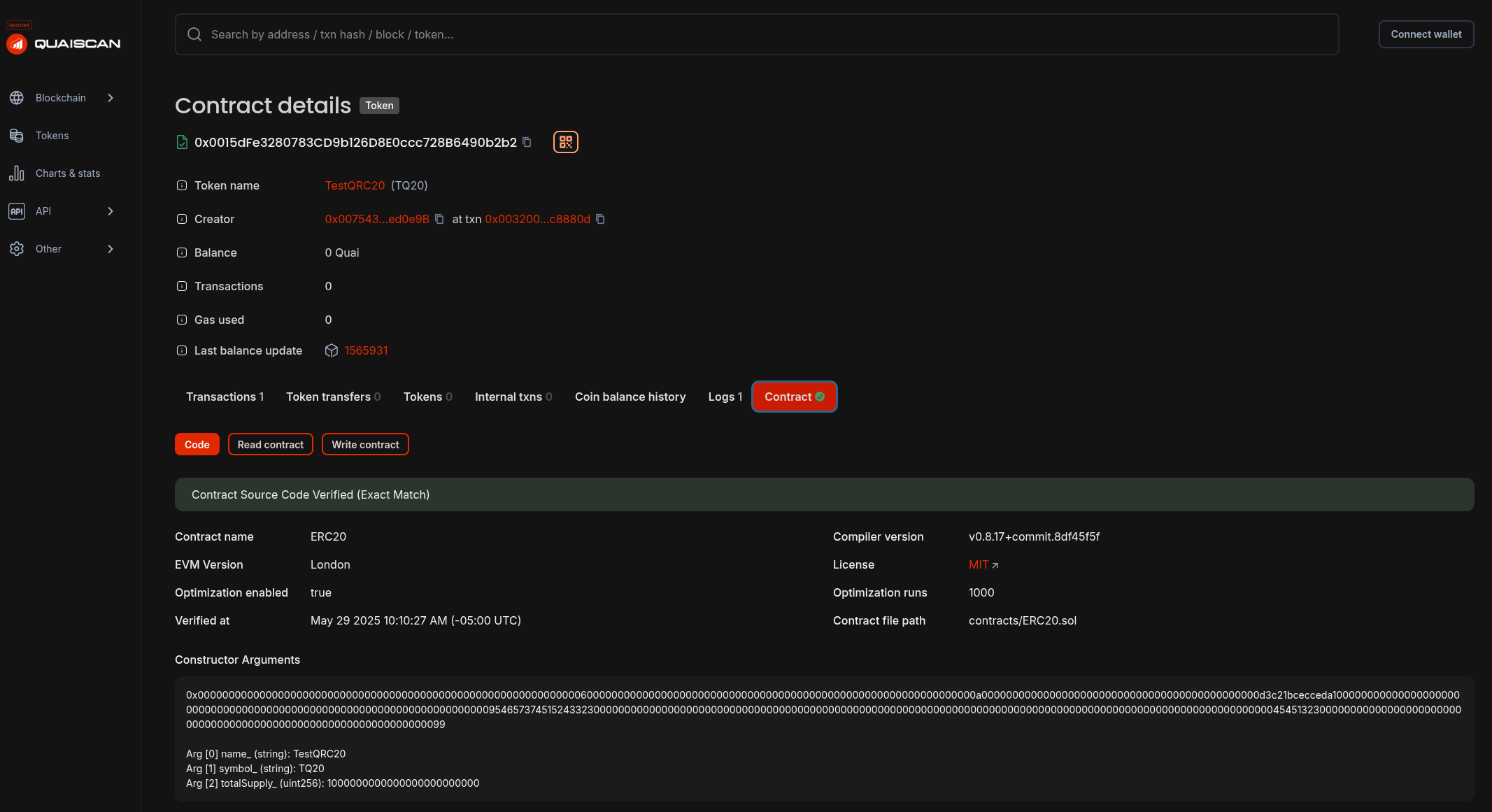 축하합니다! Quaiscan에서 스마트 계약을 성공적으로 검증했습니다!