> ## Documentation Index
> Fetch the complete documentation index at: https://docs.qu.ai/llms.txt
> Use this file to discover all available pages before exploring further.
# Quai Wallet MetaMask Snap
> Learn how to send and receive Quai in your MetaMask wallet with the Quai Wallet snap.
## Overview
The Quai Wallet snap allows MetaMask users to send and receive QUAI tokens on Quai mainnet. It also enables Quai dApps to interact with MetaMask users who have the snap installed. This integration provides a seamless way for MetaMask users to access the Quai Network ecosystem without needing a separate wallet.
## Features
Send and receive QUAI tokens on Quai mainnet directly through MetaMask
Interact with Quai dApps when support is added, using your existing MetaMask interface
Your Quai address is generated from your MetaMask keys, ensuring consistency across installations
No additional seed phrase needed - your Quai wallet is derived from your existing MetaMask keys
## Installation
### Step 1: Install from MetaMask Snaps Directory
1. Visit the [MetaMask Snaps Directory](https://snaps.metamask.io)
2. Search for "Quai Wallet" or navigate to the Quai Wallet snap
3. Click "Add to MetaMask" to install the snap
4. Follow the MetaMask prompts to approve the installation
### Step 2: Access Your Quai Wallet
Once installed, you can access your Quai wallet through MetaMask:
1. Open the MetaMask extension
2. Click the three dashed lines (⋮⋮⋮) at the top right of the MetaMask window
3. Click on "Snaps" in the dropdown list
4. Click on "Quai Wallet" in the list
5. Wait for the snap to generate your Quai wallet (this will take a few seconds)
If you do not see "Quai Wallet" in the Snaps list, ensure you have successfully installed the snap from the Snaps Directory first.
## Wallet Generation
The Quai Wallet snap generates your wallet address deterministically from your MetaMask keys. This means:
* **No seed phrase required**: Your Quai address is derived from your existing MetaMask account
* **Consistent addresses**: As long as you have your MetaMask keys, you will always generate the same Quai address
* **Secure**: Your Quai wallet inherits the security of your MetaMask setup
## Usage
### Sending QUAI Tokens
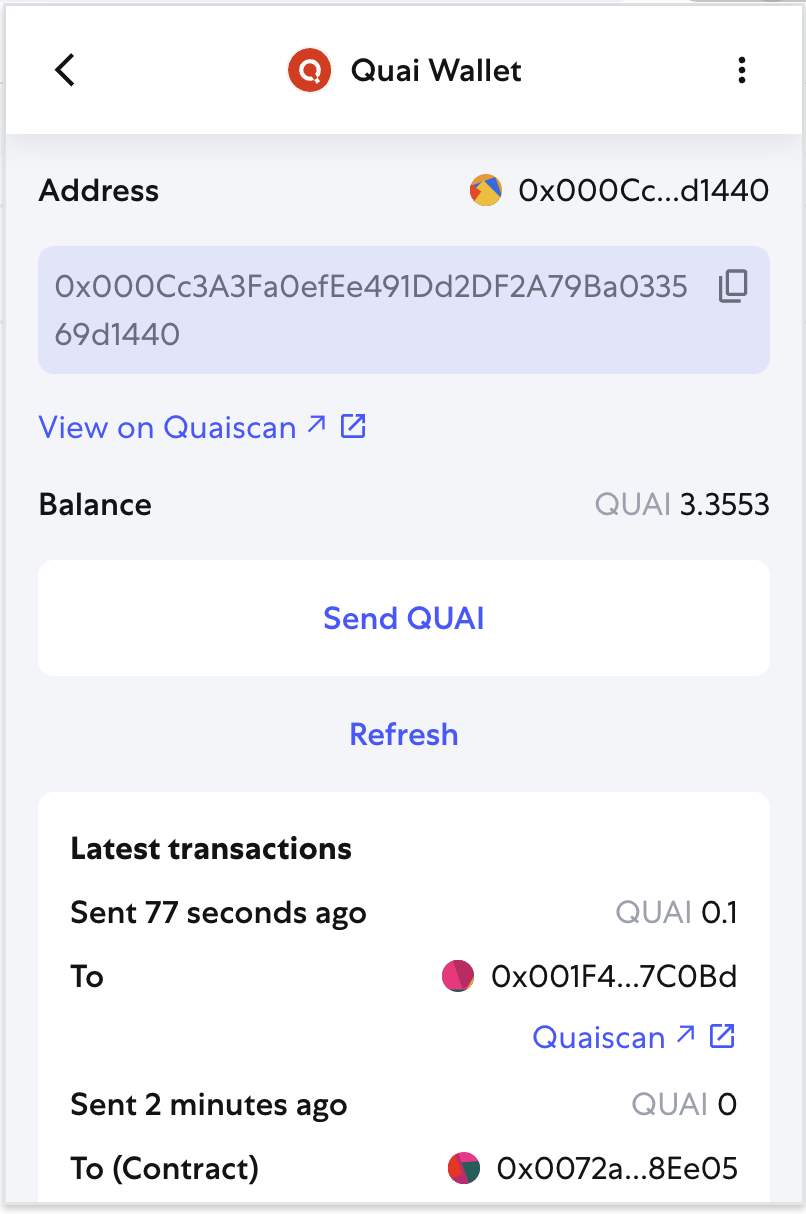
1. Access your Quai Wallet through the MetaMask Snaps interface
2. Click "Send" or "Transfer"
3. Enter the recipient's Quai address
4. Specify the amount of QUAI to send
5. Review the transaction details
6. Confirm the transaction through MetaMask
### Receiving QUAI Tokens
1. Access your Quai Wallet through the MetaMask Snaps interface
2. Copy your Quai address from the wallet interface
3. Share this address with others to receive QUAI tokens
4. Incoming transactions will appear in your transaction history
## Security Considerations
* Your Quai wallet is as secure as your MetaMask wallet
* Always verify transaction details before confirming
* Keep your MetaMask seed phrase safe - it controls both your Ethereum and Quai wallets
* Be cautious of phishing attempts and only install snaps from official sources
 ## Troubleshooting
### Snap Not Appearing
* Ensure you've successfully installed the snap from the MetaMask Snaps Directory
* Try refreshing MetaMask or restarting your browser
* Check that you're using a supported version of MetaMask
### Wallet Generation Issues
* Wait a few seconds for the wallet to generate
* If issues persist, try removing and reinstalling the snap
* Ensure your MetaMask is properly set up and unlocked
### Transaction Issues
* Verify you have sufficient QUAI balance for the transaction
* Ensure the recipient address is a valid Quai address
## Support
For issues with the Quai Wallet snap:
* Check the [MetaMask Snaps documentation](https://docs.metamask.io/guide/snaps.html)
* Visit the [Quai Network community channels](https://discord.gg/quai)
* Review the [Quai Network documentation](/learn/introduction)
## Frequently Asked Questions
MetaMask Snaps are programs that extend the functionality of MetaMask. They allow developers to add new features and capabilities to the MetaMask wallet, such as supporting new blockchains like Quai Network.
Not necessarily. The Quai Wallet snap allows you to interact with Quai Network directly through your existing MetaMask wallet. You don't need to install or manage a separate wallet application. However, for users who want the best experience with dApps, we recommend installing [Pelagus Wallet](https://pelaguswallet.io)
Yes, the Quai Wallet snap was audited by Hacken and is designed with security in mind. It generates your Quai address deterministically from your existing MetaMask keys, so it inherits the security of your MetaMask setup.
Not yet. You can receive QRC20 tokens to your address, but you currently cannot send them. This will be fixed in the next update.
Not yet. Quai dApps have to add support specifically for the Quai Wallet snap. It is a different process than integrating MetaMask directly. We will update here when dApps have added support for Quai Wallet snap. If you are interested in interacting with Quai dApps, we recommend you install [Pelagus Wallet](https://pelaguswallet.io)
No, the Quai Wallet snap was designed with the basics in mind. Your Quai address is generated from your MetaMask keys and currently only one address is generated from each MetaMask seed phrase. If you wish to generate multiple Quai addresses, we recommend you install [Pelagus Wallet](https://pelaguswallet.io)
Make sure you're visiting the official MetaMask Snaps Directory at [https://snaps.metamask.io](https://snaps.metamask.io). If you still can't find it, the snap might be temporarily unavailable or you may need to update your MetaMask version.
The snap needs to derive your Quai address from your MetaMask keys using cryptographic functions. This process takes a few seconds but only happens once per session.
Yes! Since your Quai address is generated deterministically from your MetaMask keys, you will always get the same address as long as you use the same MetaMask account.
No, you can only send QUAI tokens to valid Quai addresses. Quai addresses look like Ethereum addresses but start with 0x00.
You can check the transaction status in your Quai Wallet interface within MetaMask, or on [Quaiscan](https://quaiscan.io).
If you send QUAI to an invalid address, the transaction will fail and your tokens should be returned. Always double-check addresses before sending.
The Quai Wallet snap is specifically designed for Quai interactions. For Ethereum dApps, you'll continue to use your regular MetaMask wallet.
Common issues include insufficient QUAI balance, invalid recipient address, or network connectivity problems. Check your balance and verify the recipient address format.
Not yet. The Quai Wallet snap currently doesn't provide direct access to private keys. Your Quai wallet is derived from your MetaMask keys, so as long as you have access to your MetaMask account, you have access to your Quai wallet. This will be updated in a future version.
The Quai Wallet snap is designed to provide a seamless bridge between MetaMask users and the Quai Network ecosystem. As the ecosystem continues to grow, expect more features and dApp integrations to become available.
## Troubleshooting
### Snap Not Appearing
* Ensure you've successfully installed the snap from the MetaMask Snaps Directory
* Try refreshing MetaMask or restarting your browser
* Check that you're using a supported version of MetaMask
### Wallet Generation Issues
* Wait a few seconds for the wallet to generate
* If issues persist, try removing and reinstalling the snap
* Ensure your MetaMask is properly set up and unlocked
### Transaction Issues
* Verify you have sufficient QUAI balance for the transaction
* Ensure the recipient address is a valid Quai address
## Support
For issues with the Quai Wallet snap:
* Check the [MetaMask Snaps documentation](https://docs.metamask.io/guide/snaps.html)
* Visit the [Quai Network community channels](https://discord.gg/quai)
* Review the [Quai Network documentation](/learn/introduction)
## Frequently Asked Questions
MetaMask Snaps are programs that extend the functionality of MetaMask. They allow developers to add new features and capabilities to the MetaMask wallet, such as supporting new blockchains like Quai Network.
Not necessarily. The Quai Wallet snap allows you to interact with Quai Network directly through your existing MetaMask wallet. You don't need to install or manage a separate wallet application. However, for users who want the best experience with dApps, we recommend installing [Pelagus Wallet](https://pelaguswallet.io)
Yes, the Quai Wallet snap was audited by Hacken and is designed with security in mind. It generates your Quai address deterministically from your existing MetaMask keys, so it inherits the security of your MetaMask setup.
Not yet. You can receive QRC20 tokens to your address, but you currently cannot send them. This will be fixed in the next update.
Not yet. Quai dApps have to add support specifically for the Quai Wallet snap. It is a different process than integrating MetaMask directly. We will update here when dApps have added support for Quai Wallet snap. If you are interested in interacting with Quai dApps, we recommend you install [Pelagus Wallet](https://pelaguswallet.io)
No, the Quai Wallet snap was designed with the basics in mind. Your Quai address is generated from your MetaMask keys and currently only one address is generated from each MetaMask seed phrase. If you wish to generate multiple Quai addresses, we recommend you install [Pelagus Wallet](https://pelaguswallet.io)
Make sure you're visiting the official MetaMask Snaps Directory at [https://snaps.metamask.io](https://snaps.metamask.io). If you still can't find it, the snap might be temporarily unavailable or you may need to update your MetaMask version.
The snap needs to derive your Quai address from your MetaMask keys using cryptographic functions. This process takes a few seconds but only happens once per session.
Yes! Since your Quai address is generated deterministically from your MetaMask keys, you will always get the same address as long as you use the same MetaMask account.
No, you can only send QUAI tokens to valid Quai addresses. Quai addresses look like Ethereum addresses but start with 0x00.
You can check the transaction status in your Quai Wallet interface within MetaMask, or on [Quaiscan](https://quaiscan.io).
If you send QUAI to an invalid address, the transaction will fail and your tokens should be returned. Always double-check addresses before sending.
The Quai Wallet snap is specifically designed for Quai interactions. For Ethereum dApps, you'll continue to use your regular MetaMask wallet.
Common issues include insufficient QUAI balance, invalid recipient address, or network connectivity problems. Check your balance and verify the recipient address format.
Not yet. The Quai Wallet snap currently doesn't provide direct access to private keys. Your Quai wallet is derived from your MetaMask keys, so as long as you have access to your MetaMask account, you have access to your Quai wallet. This will be updated in a future version.
The Quai Wallet snap is designed to provide a seamless bridge between MetaMask users and the Quai Network ecosystem. As the ecosystem continues to grow, expect more features and dApp integrations to become available.