> ## Documentation Index
> Fetch the complete documentation index at: https://docs.qu.ai/llms.txt
> Use this file to discover all available pages before exploring further.

# Media Kit

> Brand guidelines and media assets for Quai Network, Pelagus, and Blip.

<Card title="Brand Guide Outline" img="https://mintcdn.com/dominantstrategies/L_BZnGV9LQ3DaF7-/images/MediaKit/Brand%20Guide%20Cover%20Page.png?fit=max&auto=format&n=L_BZnGV9LQ3DaF7-&q=85&s=e59dec7936afed12f8efd7c30bc517a9" href="https://drive.google.com/file/d/1kDyNRAyE8SoWlbMiEr9tZiHDRQrWsHGu/view?usp=sharing" width="1920" height="1080" data-path="images/MediaKit/Brand Guide Cover Page.png">
  The Quai Network brand guide is essential for cultivating a cohesive brand identity.
</Card>

## Quai Network Logos and Wordmarks

<Card title="Brand Guide Logos Archive" icon="file-arrow-down" href="https://drive.google.com/file/d/1qMfwJJ0yNNsyoFlZ3tcLjugk-4XjQ5Vi/view?usp=drive_link">
  The logo package includes every lockup/wordmark/logo included in Quai Network's brand guidelines in PNG and SVG format in black and white colorways.
</Card>

<Columns cols={3}>
  <Card title="Black Font Logos" href="https://drive.google.com/drive/folders/1wWyHwKuQDQr_ZaPAk3ErsItLkQMh_c6-?usp=sharing" img="https://mintcdn.com/dominantstrategies/8SSQLJme_UOQ8gsp/images/MediaKit/QuaiNetwork_WordMark-1.svg?fit=max&auto=format&n=8SSQLJme_UOQ8gsp&q=85&s=21137011dd42355bdae839dea3feeeb4" cta="Download here" width="436" height="180" data-path="images/MediaKit/QuaiNetwork_WordMark-1.svg">
    Quai Network logo pack in .SVG and .PNG formats.
  </Card>

  <Card title="White Font Logos" href="https://drive.google.com/drive/folders/13xahBHQa0ECS7dCRfGYZXiZyIVGiGECn?usp=sharing" img="https://mintcdn.com/dominantstrategies/8SSQLJme_UOQ8gsp/images/MediaKit/QuaiNetwork_WordMark.svg?fit=max&auto=format&n=8SSQLJme_UOQ8gsp&q=85&s=59fbd80e6591591b9564ac49e0898f1f" cta="Download here" width="436" height="180" data-path="images/MediaKit/QuaiNetwork_WordMark.svg">
    Quai Network logo pack in .SVG, .PNG, and .AI formats.
  </Card>

  <Card title="Qi Logos" href="https://drive.google.com/drive/folders/1W24Q4A-j-CdA78b81dS5huZUqRCkoVp6?usp=sharing" img="https://mintcdn.com/dominantstrategies/8SSQLJme_UOQ8gsp/images/MediaKit/Qi_docs_display.svg?fit=max&auto=format&n=8SSQLJme_UOQ8gsp&q=85&s=3bc02db75fba448e8c7664d578cbcf15" cta="Download here" width="436" height="180" data-path="images/MediaKit/Qi_docs_display.svg">
    Qi and Wrapped Qi logos in .SVG and .PNG formats.
  </Card>
</Columns>

## Fonts

<Frame>
  <img src="https://mintcdn.com/dominantstrategies/L_BZnGV9LQ3DaF7-/images/MediaKit/Quai%20Network%20Typography.png?fit=max&auto=format&n=L_BZnGV9LQ3DaF7-&q=85&s=a2651412f6f1879573fc66cab571da87" alt="The three fonts used in Quai Network typography, Yapari, Bai Jamjuree, and Monorama." width="3840" height="1846" data-path="images/MediaKit/Quai Network Typography.png" />
</Frame>

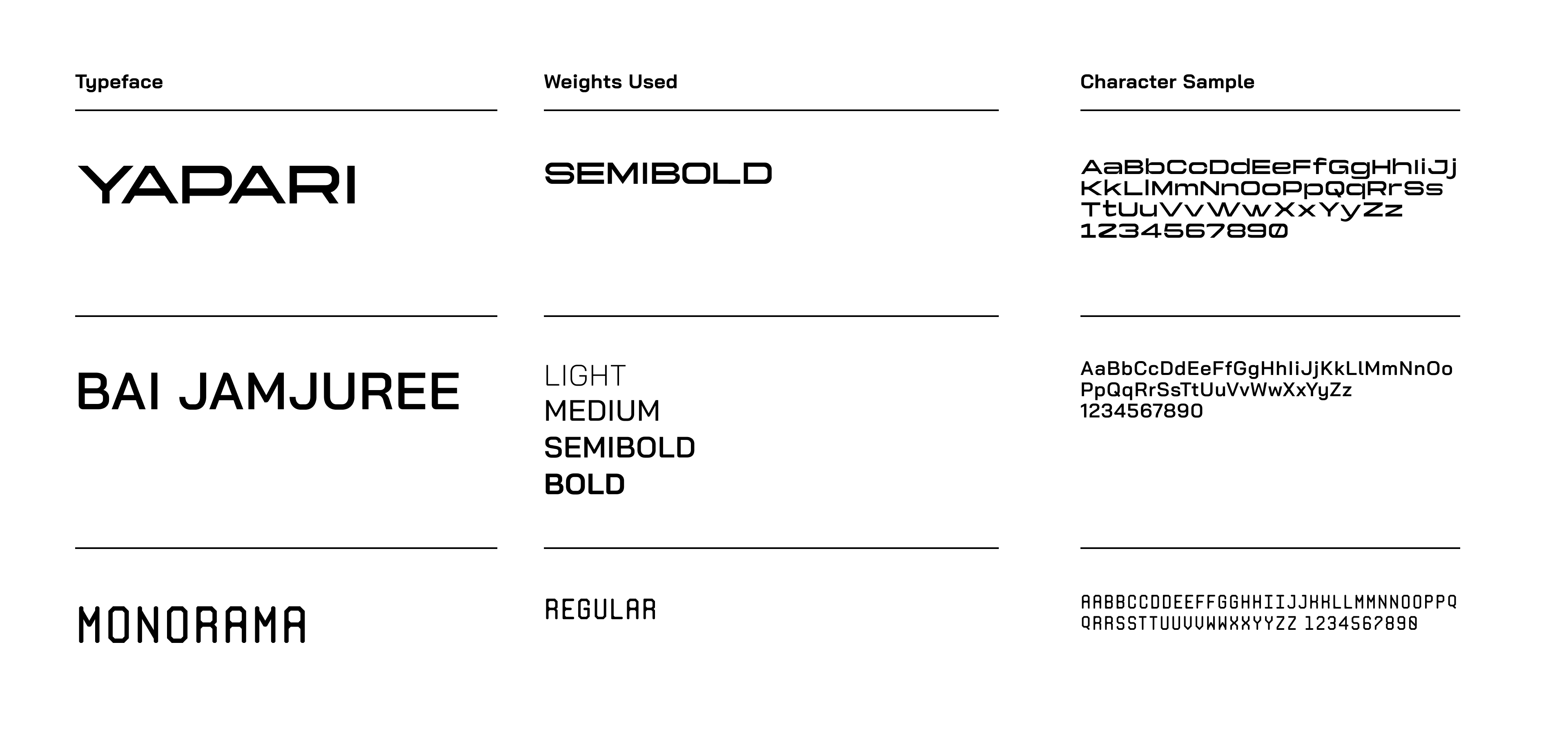
Our brand's typography is thoughtfully selected to optimize communication. Yapari is employed for headlines, offering a bold and distinct appearance. Bai Jamjuree serves as the workhorse for body text and other essential copy, ensuring readability and coherence. Monorama is reserved for subheadings and detail text, subtly contributing to a well-balanced typographic scheme. This selection aims to facilitate clear and effective communication while maintaining a simple and understated aesthetic.

<Card title="Download here" href="https://drive.google.com/drive/folders/15ATIIFt7UWcL_SCs7JAACCxOEQe2mXlE?usp=drive_link" />

## Color Pallet

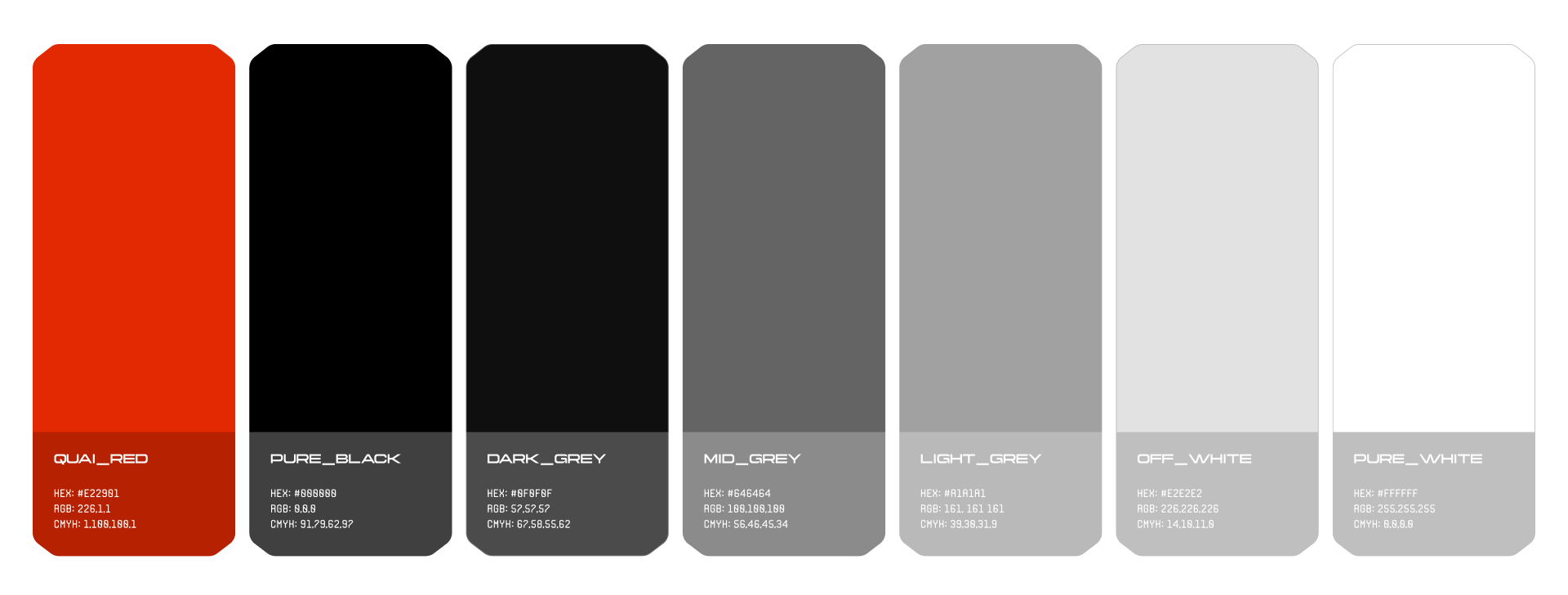
The Quai color palette is predominantly monotone, using different shades between black and white, but there is a bold red to use as an accent color. This vivid red serves as a dynamic focal point, injecting energy and vibrancy into our visual identity. Its deliberate and consistent use contributes to brand recognition and reinforces a cohesive and impactful design language for the Quai brand.
<Frame>
  <img src="https://mintcdn.com/dominantstrategies/L_BZnGV9LQ3DaF7-/images/MediaKit/Quai-Network-Color-Pallet.png?fit=max&auto=format&n=L_BZnGV9LQ3DaF7-&q=85&s=4d130f8e3b378d31013e5f11e89e5be1" alt="Quai colors: QUAI RED HEX: #E22981 RGB: 226.1,1 CMYH: 1.180.108.1 PURE BLACK HEX: #088880 RGB: 8.8.0 СМУН: 91.29.62.92 DARK GREY HEX: #8F0FBF RGB: 52.52.57 CMYH: 62.58.55.62 MID GREY HEX: #646464 RGB: 108.108,108 CMYH: 56.46.45.34 LIGHT GREY HEX: #A1A1A1 AGB: 161, 161 161 CMYH: 39.38.31.9 OFF-WHITE HEX: #E2E2E2 RGB: 226.226.226 CMYH: 14.18.11.8 PURE WHITE HEX: #FFFFFF RGB: 25S.255.25S CMYH: 8.8.8.8" width="1920" height="729" data-path="images/MediaKit/Quai-Network-Color-Pallet.png" />
</Frame>

## Pelagus and Blip Assets

<Columns cols={3}>
  <Card title="Blip Assets Pack" href="https://drive.google.com/drive/folders/1mRUejSG7H5rUG0zEIuFOCMh6Eebb40ru?usp=drive_link" img="https://mintcdn.com/dominantstrategies/8SSQLJme_UOQ8gsp/images/MediaKit/Blip%20logo%20square%202.svg?fit=max&auto=format&n=8SSQLJme_UOQ8gsp&q=85&s=5acca6e95751d8b0e4d1d2a388233e8f" cta="Download" width="400" height="400" data-path="images/MediaKit/Blip logo square 2.svg">
    Blip logos and app images in .SVG and .PNG formats.
  </Card>

  <Card title="Pelagus Assets Pack" href="https://drive.google.com/drive/folders/1VKR5j2P1vgVapNoaW2PZCDEOeooNBMxU?usp=drive_link" img="https://mintcdn.com/dominantstrategies/8SSQLJme_UOQ8gsp/images/MediaKit/pelagus%20icon%20square.svg?fit=max&auto=format&n=8SSQLJme_UOQ8gsp&q=85&s=260f14ddb8a7d92be970d1ac7181f4ee" cta="Download" width="400" height="400" data-path="images/MediaKit/pelagus icon square.svg">
    Pelagus Wallet logos and app images in .SVG and .PNG formats.
  </Card>

  <Card title="Kipper Assets Pack" href="https://drive.google.com/drive/folders/1dPP_-rbXm3PF9B_oShThLALZN-VOzALC?usp=drive_link" img="https://mintcdn.com/dominantstrategies/8SSQLJme_UOQ8gsp/images/MediaKit/kipper%20logo%20square.svg?fit=max&auto=format&n=8SSQLJme_UOQ8gsp&q=85&s=724bb0ebe946c7ee772b44a7c6d8ca0a" cta="Download" width="400" height="400" data-path="images/MediaKit/kipper logo square.svg">
    Kipper logos and app images in .SVG and .PNG formats.
  </Card>
</Columns>