> ## Documentation Index
> Fetch the complete documentation index at: https://docs.qu.ai/llms.txt
> Use this file to discover all available pages before exploring further.
# Making Requests
> How to make API requests to Quai Network using Postman.
This guide assumes you have already installed [Postman](https://www.postman.com/downloads/) and imported the [Quai Postman
Collection](/build/apis/postman/setup) and [Example Quai Postman
Environment](/build/apis/postman/variables).
## Introduction
Making requests to a go-quai client via the Quai Postman collection is straightforward. The basic steps to making a request are:
Select a request from the Quai Postman collection
Ensure the URL in the request is correct for the chain you want to interact with (e.g. cyprus1 endpoint for cyprus 1 queries)
Edit the request body with the desired parameters (e.g. address, block number, etc.)
Click the `Send` button to make the request
View the response in the section below the request body
## Making Your First Request
To make your first request to a go-quai client, open the Quai Postman Collection in the left sidebar of Postman and select a request from the collection. For example, let's select the `getBalance` request under the `quai` folder:
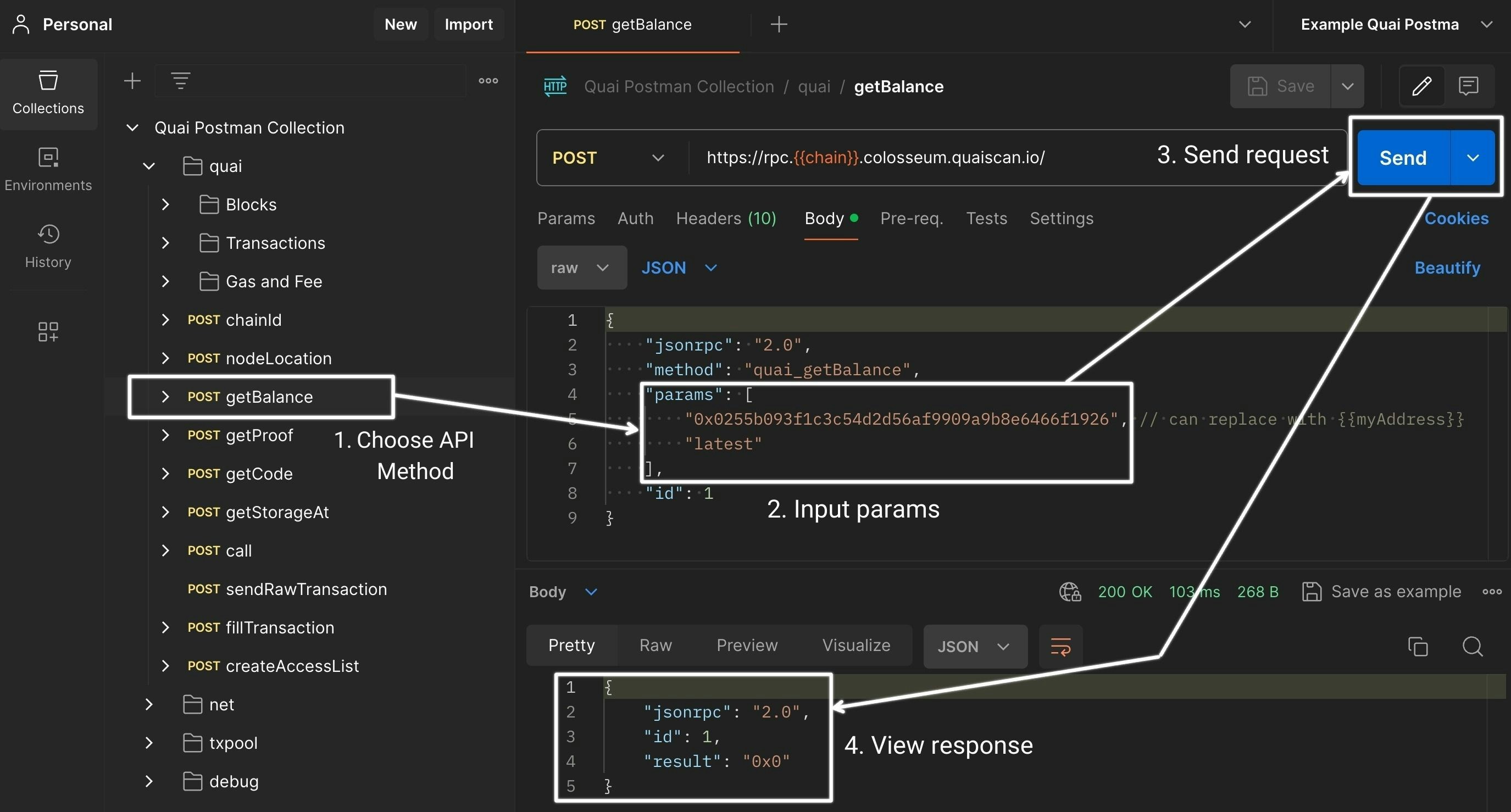 Once you've selected `getBalance`, you'll be directed to the `Params` tab for the request. To edit the parameters for the request, choose the `Body` tab to see the JSON-RPC request body:
```JSON theme={null}
{
"jsonrpc": "2.0",
"method": "quai_getBalance",
"params": [
"0x0255b093f1c3c54d2d56af9909a9b8e6466f1926", // can replace with {{myAddress}}
"latest"
],
"id": 1
}
```
To request the balance of a specific address, replace the placeholder address `0x0255b093f1c3c54d2d56af9909a9b8e6466f1926` with the address you'd like to query. You can also use the `{{myAddress}}` environment variable to reference your own address *if you've configured it in the environments tab on the left*.
More information on how to configure environment variables like `{{ myAddress }}` can be found in the [Environment Variables
Guide](/build/apis/postman/environment).
Once you've updated the request body with the desired address, click the `Send` button to make the request. The response will be displayed in the response section below the request body:
```JSON theme={null}
{
"jsonrpc": "2.0",
"id": 1,
"result": "0x0"
}
```
## Common Mistakes
### Chain and Data Mismatch
Often times sending a request using the Quai Postman Collection can result in one of the following errors: `address is not in scope` or `genesis is not traceable`.
If this is the case, it's likely that the params you are passing to the method call do not correspond with the RPC endpoint you are querying. Ensure that the `chain` environment variable (or manually set request URL) is set to the correct chain you are querying data from.
**Example**:
* Querying the URL: `https://rpc.cyprus1.quaiscan.io` with a `getBalance` request for an address that only exists on `hydra3`: `0xfbca7e03dc8b5c4cc327c92de8ba1af66d34ac70`.
### Non-Existent Data
When sending requests related to blocks or transactions, often times the node will return an error related to `method handler crashed` or `no data found`. This is often due to the block or transaction hash not existing on the chain you are sending the request to.
Ensure that the block number or transaction hash you are providing exists on the canonical chain you are querying.
**Example:**
* Requesting block data for block 10000 when the chain you are querying only has 5000 blocks.
## Conclusion
Now that you've made your first request to a go-quai client using the Quai Postman Collection, you're ready to start exploring the full range of API requests available in the collection. For specifications on available methods and parameters, refer to the [Quai JSON-RPC API documentation](/build/playground/overview) or the [Quai Postman Collection](https://docs.api.qu.ai/).
Once you've selected `getBalance`, you'll be directed to the `Params` tab for the request. To edit the parameters for the request, choose the `Body` tab to see the JSON-RPC request body:
```JSON theme={null}
{
"jsonrpc": "2.0",
"method": "quai_getBalance",
"params": [
"0x0255b093f1c3c54d2d56af9909a9b8e6466f1926", // can replace with {{myAddress}}
"latest"
],
"id": 1
}
```
To request the balance of a specific address, replace the placeholder address `0x0255b093f1c3c54d2d56af9909a9b8e6466f1926` with the address you'd like to query. You can also use the `{{myAddress}}` environment variable to reference your own address *if you've configured it in the environments tab on the left*.
More information on how to configure environment variables like `{{ myAddress }}` can be found in the [Environment Variables
Guide](/build/apis/postman/environment).
Once you've updated the request body with the desired address, click the `Send` button to make the request. The response will be displayed in the response section below the request body:
```JSON theme={null}
{
"jsonrpc": "2.0",
"id": 1,
"result": "0x0"
}
```
## Common Mistakes
### Chain and Data Mismatch
Often times sending a request using the Quai Postman Collection can result in one of the following errors: `address is not in scope` or `genesis is not traceable`.
If this is the case, it's likely that the params you are passing to the method call do not correspond with the RPC endpoint you are querying. Ensure that the `chain` environment variable (or manually set request URL) is set to the correct chain you are querying data from.
**Example**:
* Querying the URL: `https://rpc.cyprus1.quaiscan.io` with a `getBalance` request for an address that only exists on `hydra3`: `0xfbca7e03dc8b5c4cc327c92de8ba1af66d34ac70`.
### Non-Existent Data
When sending requests related to blocks or transactions, often times the node will return an error related to `method handler crashed` or `no data found`. This is often due to the block or transaction hash not existing on the chain you are sending the request to.
Ensure that the block number or transaction hash you are providing exists on the canonical chain you are querying.
**Example:**
* Requesting block data for block 10000 when the chain you are querying only has 5000 blocks.
## Conclusion
Now that you've made your first request to a go-quai client using the Quai Postman Collection, you're ready to start exploring the full range of API requests available in the collection. For specifications on available methods and parameters, refer to the [Quai JSON-RPC API documentation](/build/playground/overview) or the [Quai Postman Collection](https://docs.api.qu.ai/).